Introduction to TAGteach - Lessons
Welcome to the lesson page. This is where you will find the lesson content, quizzes and certificate.
How to use this course: You can move through the lessons in order, or you can move around by clicking on the headings from the course outline menu. The course will return you to the last part of the course that you visited if you leave and return. This course is hosted with a course host called Versal and is embedded here on this page. If you somehow find yourself on the Versal page, you can use the browser back button to get back, or use the link you initially used to access the course.
Moving through the course: The course content window has it's own scroll bar at the right side of the window. Use this to scroll down through the lesson content. At the bottom of each lesson there is a tab to move to the next lesson.
Course Outline Menu: Scroll to the bottom of the lesson window. To the left of the Next Lesson tab, is a tab with three horizontal lines. Click on this tab to see the complete course outline. You can move around by clicking on the links in the outline. Click on the tab again to collapse the menu.
Course Outline: Click here to download the outline
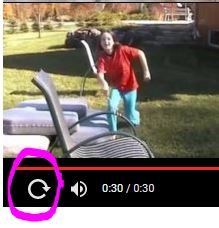
Videos: The videos in this course are hosted by YouTube as private videos. When a video finishes, other video choices appear in the video window. We suggest that you ignore subsequent videos since they may be unrelated to the course. To replay a video, click on the replay icon as shown here:
Mobile Devices: You will be taken to the course host, Versal, to view the Lessons section. Scroll down until you see the "Launch Course" button. Click on this to access the course material. Use the back button on your browser to return to this page to view the course library, or click on the Return to Course Home link at the end of the course. Please don't click on the link that says "Return to Courses", or the "Finish Course" link as these will take you out of the course and ask you to create a new account. Use the browser back button if you find yourself on an unfamiliar page.
Quizzes and Study Aids: There are some mini-quizzes and practice games throughout the course. These are optional. If you wish to apply for Level 1 TAGteach Certification you must complete the final quiz at the very end of the course. Be sure to click on "submit" after every quiz question to get immediate feedback and a chance to try again.
Error Messages: Occasionally you may see a error indicating that a gadget did not load. Please refresh your browser and this should fix the problem right away. If this persists please send an email to support@versal.com for help.